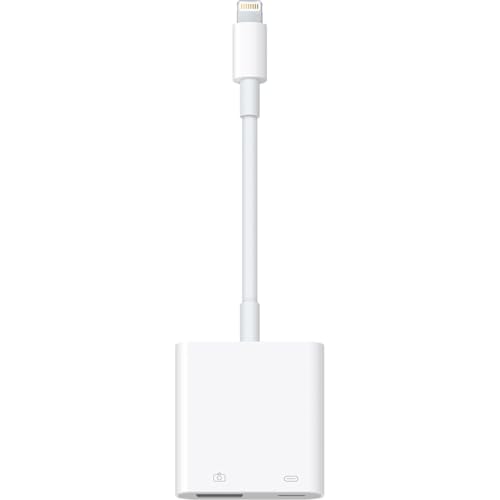

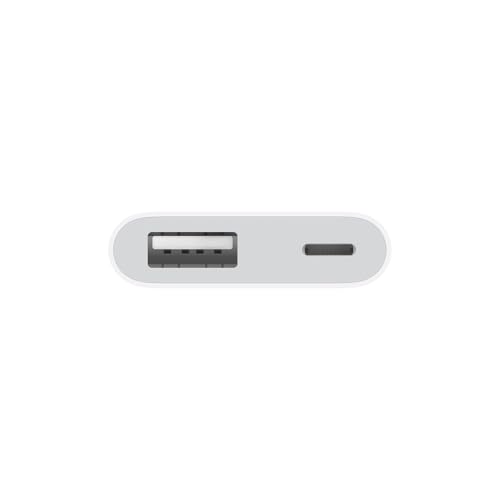

⚡ Power your creativity with Apple’s Lightning to USB 3 Camera Adapter — don’t get left behind!
The Apple Lightning to USB 3 Camera Adapter enables high-speed USB 3 data transfers on select iPad Pro models, allowing seamless import of photos and videos directly from digital cameras. It requires an external power source to operate optimally and supports a wide range of USB peripherals, making it an essential tool for professionals seeking to expand their iPad’s connectivity and media management capabilities.
| ASIN | B01F7KJDIM |
| Date First Available | November 1, 2018 |
| Is Discontinued By Manufacturer | No |
| Item Weight | 1.76 ounces |
| Item model number | MK0W2AM/A |
| Manufacturer | Apple |
| Product Dimensions | 2.6 x 0.67 x 6.1 inches |
L**A
Fast and easy, but read my UPDATE …
UPDATE - October 2, 2024. This adapter works with iPhone 13 on iOS 18, but not with iPad Mini6 on iPadOS 17.7. Just a heads up. At the time I bought it everything worked good with the older model iPhone and iPad 8th Gen, mainly because this is a lightning not USB C plug in. Had to buy a new Apple adapter (here on Amazon, genuine Apple USB-C Digital AV Multiport Adapter) to get everything going again on file transfer for the iPad Mini6. Also, I noted in my original review below, this lightning to USB 3 adapter needs an additional power supply (wall plug) to operate the transfer. The new USB C Digital AV Multiport Adapter does not require extra power to work. A real plus! Plug that baby into your iPad or iPhone that has a USB C charging port and you’re good to go. ORIGINAL REVIEW - This adapter was exactly what I was looking for to transfer photos to/from a PC to iOS and iPadOS devices. Initially the not enough power notification came through as noted by others until I realized it needed to be plugged into the wall, or a power bank. Once the lightning port was plugged into the adapter and connected to a power source with my Apple cable and wall plug (or power bank), I then connected the usb with my photos copied from the PC to the USB port on the adapter. Final step was connecting the whole unit to the iPhone with the adapter’s lightning cable. My iPhone Files app read the drive and the usb with jpg files was recognized and placed onto the list of Locations for the iPhone Files app. Simply tapped the files I wanted to download into my photos app and they were there in just a very short time. It also works with a power bank while mobile. This procedure also worked flawlessly with my iPad running on iPadOS 14.8. But take note, the power supply for the iPadOS must be its original charging plug for the files to transfer. It’s a higher power source to adequately accommodate the function of the adapter itself. I can also transfer jpg files to the usb from my IPhone and iPad to the PC. I noticed when uploading these files to the usb from my iOS device there are duplicate file types. One is recognizable as a standard jpg file and the other is a type of file not recognized by my PC. Not sure about the whys and the wherefores specific to this transfer, but the file that is compatible with the computer is standard identity where jpg files are concerned. The odd name has a couple of characters in it before the common file name. I downloaded both to the desktop and put the common file name into a file I created on the PC and deleted the other. Hope this helps and makes sense. I’m not a tech guru but I do enough trial and error based on common logic to get results. There is also a YouTube video that shows steps for working with file transfers on iOS devices from a PC.
W**T
Works when called for only if everything is Updated and Apple Certified
Appears to do everything it’s supposed to do according to Documentation referring to using it for whatever Product you are trying to connect your iPad to. If there is any issue it’s always an Update Issue with either the App is not Updated or the iPad. It’s very difficult to keep Applications and Operating System currently Updated across the board; that is an Apple Issue in its entirety. But if everything is Updated and the Documentation calls for using one of these to make your device happy with the iPad it will work. It does for me. Oh, other factors that could make it not work are Cables. If anything in your path is not Apple or something Apple endorses it wont work. That is the nature of Proprietary Software and Hardware is extortion and greed. That is why everywhere else in my Audio world I use Linux. Just about everything on earth works with Linux except Proprietary things. Far more affordable and fun. I do like my iPad but I will never buy another anything that does not use USB C anymore. This will be my very last Lightning device. And if I go iPad again it will be the newer ones with USB C only. Everything USB C until they come out with something new and different that everyone migrates to. Until then I will make this work. For me it’s for my Audio things; Recording Guitar and Music. I do all my Editing through DAW’s on a Linux computer.
J**Y
Good product
Works great
J**E
Almost returned it, then changed the usb adapter
I bought this on the recommendation of an article at Apple's site, so that I could connect my iPad to some 2T external SSD drives. I need this for load and backup files on the iPad. When I first opened the box and tried it, nothing worked. Nothing was recognized other than flash drives and SD card readers declared upon connection that I needed to power the device in order for it to be used. I was convinced the adapter was defective because it was connected to power, and yet it asked for power. I started a return and packed it up. I then saw a photo of it in use with a power cable...and thought perhaps the usb adapter the lightning cable was connected to was underpowered. Unpackaged everything, plugged it into the back of my iMac...and it worked. Connected to most of my flash drives and to the important 2T SSD drives, and transferred files with no problem. It also works when powered by an external battery pack, although some of these do not supply enough power. I have one that came with my phone that is 2.0A output. Doesn't work. Minimum amp output on a usb adapter for this seems to be 2.1A (same as the output on the adapter that came with the iPad). This is consistent across multiple USB adapters that I've tried. I have yet to find any of my external devices that work with this when unplugged from power, unless that device is, itself, powered. I have yet to determine why some flash drives are not recognized. It may be the formatting, but my SSDs are formatted for Mac and for PC, respectively, and both are recognized, so still working on that question. Anyway, I can't find where the USB Amperage is mentioned in the little insert included with this adapter, so I hope this helps some of y'all.
C**.
Es muy buen producto
R**I
Works great!
D**P
I tried my camera, external drive, SD card, 8 out 10 didn’t work. I went to Apple Store to ask the genius for help, and they said it’s normal for this product.
L**C
I use this to charge my iPhone 11 Pro while hooked up to a USB DAC for listening to music. It works perfectly and is very well built.
H**O
Bom acabamento e perfeito funcionamento. Vale lembrar que para usar alguns dispositivos é necessário plugar a cabo lightning no carregador pois o iPhone não tem energia para alimentar o dispositivo.
Trustpilot
1 month ago
2 weeks ago


