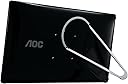

🚀 Elevate your workspace anywhere—power, portability, and performance in one sleek package!
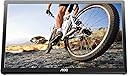
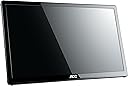
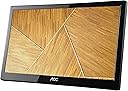
The AOC e1659Fwu is a 15.6-inch ultra-slim portable LED monitor featuring a 1366x768 HD resolution, powered entirely via a single USB 3.0 cable. Weighing only 2.4 pounds, it offers a 60Hz refresh rate and 8ms response time, making it an ideal dual-monitor solution for professionals who demand mobility and seamless plug-and-play compatibility with Windows and Mac systems.


| ASIN | B00CMKOVMO |
| Best Sellers Rank | #59,431 in Electronics ( See Top 100 in Electronics ) #1,378 in Computer Monitors |
| Brand | AOC |
| Color | Black |
| Customer Reviews | 4.2 4.2 out of 5 stars (7,957) |
| Date First Available | July 18, 2013 |
| Is Discontinued By Manufacturer | No |
| Item Dimensions LxWxH | 8.63 x 14.56 x 0.87 inches |
| Item Weight | 2.4 pounds |
| Item model number | E1659FWU |
| Manufacturer | AOC |
| Max Screen Resolution | 1366 x 768 |
| Number of Processors | 1 |
| Number of USB 3.0 Ports | 1 |
| Product Dimensions | 8.63 x 14.56 x 0.87 inches |
| Screen Resolution | 1366x768 |
| Series | AOC Portable Monitor |
| Standing screen display size | 16 Inches |
| Voltage | 5 Volts |
L**Y
Great monitor, as long as you know your laptop/phone/hub support USB C video
This is a nifty portable monitor. Part of the reason I am so happy with it is that I got one used for only 49.99. The included magnetic cover does double duty protecting the screen when you're not using it, and holding the screen up when you're using it. And it works perfectly. Plug it in using the included USB-C cable, and bam. It works with my iPhone 15. It also works perfectly with my Mac Book Air, where I can easily use it in vertical or horizontal format. But it will not work with my work Dell laptop--that doesn't support USB C Video. BE AWARE-- if you want to connect a keyboard and mouse as well, via a hub, you have to be careful. The only hubs that pass through USB C video are pricey as of 6/2024. Look for "DP Alt Mode Video" in the description (the cheapest I could find was the "Startech 4 port USB hub with USB DP Alt Mode Video Output for 79.99).
T**Y
Used with HP envy dv7 17.3" Laptop with Windows 8.1 for school
My workplace spoiled me with having two monitors to perform my daily functions. After I purchased my HP envy I was forced back to doing my school work on one monitor. This, of course, was not working for me. At first, I was using my kids 20” LCD TV and the HDMI connection for a second monitor. However, this was just not working (for the kids, lol). So, I jumped on Amazon in search of another monitor but wanted something that I could keep with my laptop all the time. Walla, I found the AOC 16” USB powered monitor. Right out of the box I plugged it up (with the provided cable). Windows immediately recognized the new hardware and started searching and downloaded the driver. The only problem was it did not have the proper driver to detect the monitor being in landscape versus portrait and I would have to manually change it. But as soon as I popped in the disc; It updated and worked fine. It is not 1080p, but the picture looks really good. It is clear and crisp and has a lot more depth than what I expected. The provided cable is designed to plug into the USB 3.0 and into a USB 2.0 port to power the monitor. Don’t make the mistake that I did in ordering a second cable. The part that plugs into the monitor is not the same as a mini USB. It is completely different. I assume it is AOC’s design. It also comes with a nice soft feeling sleeve that comes with it for storage. This is pretty cool but not very useful to me. I simply slip it in the extra pocket in my laptop case, when not in use. So far, I have not experience the glitching that others have noted. This product has been a great asset for me when doing school work. I can pull up my e-books on it while I do my work or write an essay my laptop screen. If you are looking for something to help with school or work, this is perfect. Maybe you need to make up a presentation and want to display it to other while you control the slides. There are so many uses for a dual monitor from entertainment to multitasking. This thing is an excellent addition to any computer or laptop.
D**A
Very functional, durability is questionable
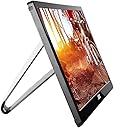
I've purchased about eight of these monitors so far to replace an earlier model for users who frequently travel to customer sites and need a second monitor. So far everyone has been very happy with the performance and image quality. It's very light weight, has a solid metal stand and is thin so portability isn't a problem. Three things to note: 1. The neoprene sleeve that is included in the box is pretty thin so while it keeps the monitor frame from minor scratches and bumps it does nothing to protect the actual LCD. It would've been nice if the sleeve was firm on one side to shield objects from applying pressure directly to the LCD panel. Best to add a rigid card or other cover to protect the panel while in the sleeve or buy a laptop bag to give it a little more protection. 2. The USB jack is in a better location than the previous version but is still extremely prone to damage. In fact, I just bought one last week where a user accidentally pulled the USB cord out (possibly dropped it while it was connected) and it has damaged the micro USB 3.0 port on the back of the display causing the display to flicker on and off; essentially e-waste. I might try to solder on a new jack if I can find the right part. The jack itself seems shallow so any micro USB 3.0 cable you plug into it doesn't seem to go all the way in and as a result makes for a loose connection to begin with. To improve the longevity and durability of these monitors, I take a few extra steps to adhere the usb cable with zip ties and tie mounts (need to notch out the tie mounts so the cable sits flush) to the back of the display to minimize the change of the USB port snapping off. Tie mount part number is Startech HC102, under $6 for 100 3. It's better to get the original USB display driver direct from DisplayLink http://www.displaylink.com/ I just bought some 6 inch micro USB cables to permanently affix it to the back of the panel so that users won't need to plug and unplug cables directly into the jack itself. Hopefully, this will keep the LCDs working longer.
M**Z
La uso mucho. Sin embargo le falta poco de brillo. La calidad visual digamos que esta bien. Pero al ser extendido de una pantalla macbook pro se ve un poco deficiente en colores. Pero me ayuda mucho a tener dos pantallas ser portable como un ipad grande. Y solo con el usbc energizarse. Vale la pena por lo que se paga. Siempre cargo mo notebook y este. Solo que aunque tenga su cover que es su stand. Para que no se raye compre una funda Pague garantía extendida. Por si las dudas. Pero ya tengo 6 meses y sin problema
H**P
Good product
J**S
El monitor funciona a base de USB 3 e incluye cable y funda de viaje. El Monitor tiene muy buena calidad de imagen, tiene buen tamaño, es un poco grueso, pero es muy ligero. No hay problema para transportarlo, pero es más grueso que una laptop, y un poco más largo que una laptop de 15 pulgadas de pantalla. La relación de precio calidad es muy bueno. La calidad del plástico es buena, pero no lo dejaría caer de alguna mesa muy alta. En general el producto cumplió con las expectativas, la calidad de imagen valen mucho la pena, y la portabilidad. 100% recomendado.
S**E
The monitor is Light weight and having that extra screen is so good when traveling
N**I
For this price point ($108), it's worth it! Literally plug and play for my Dell laptop I didnt need to install any driver etc! I love that it comes with its own padded bag. I should have invested in this wayyy earlier! No regrets. BUYYYY IT.
Trustpilot
2 weeks ago
1 week ago