



🚀 Power your network like a pro — silent, sleek, and seriously fast.
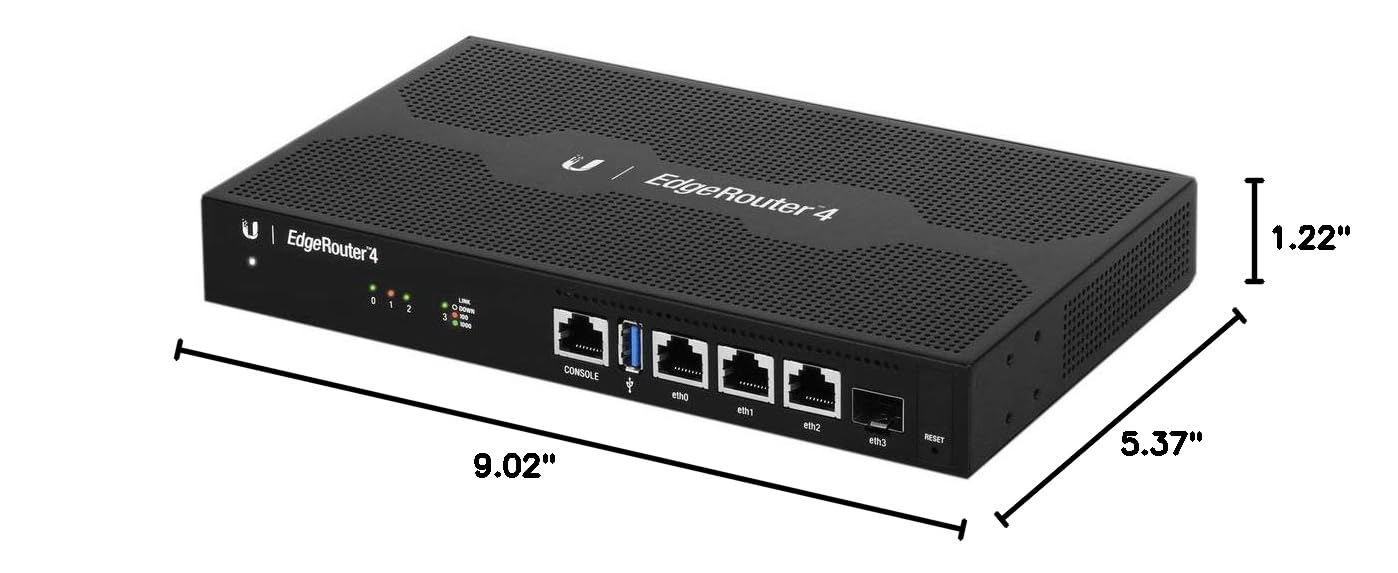
The Ubiquiti EdgeRouter 4 is a compact, fanless router designed for professionals and tech-savvy users seeking enterprise-level performance without enterprise complexity. Featuring 3 Gigabit Ethernet ports, 1 SFP fiber port, and a robust EdgeOS interface, it delivers up to 3.4 million packets per second and 4Gbps throughput while consuming just 13 watts. Its versatile mounting options and silent operation make it ideal for modern offices and advanced home networks.


| ASIN | B078PGCGN2 |
| Antenna Location | Home |
| Best Sellers Rank | #10,443 in Computers & Accessories ( See Top 100 in Computers & Accessories ) #367 in Computer Routers |
| Brand | Ubiquiti Networks |
| Built-In Media | Rack Ears, Mounting Hardware |
| Color | black |
| Compatible Devices | Personal Computer |
| Connectivity Technology | Ethernet |
| Control Method | Voice |
| Controller Type | Serial and Ethernet |
| Customer Reviews | 4.3 out of 5 stars 936 Reviews |
| Data Transfer Rate | 4 Gigabits Per Second |
| Frequency Band Class | Single-Band |
| Global Trade Identification Number | 00817882020633 |
| Has Internet Connectivity | Yes |
| Has Security Updates | Yes |
| Is Modem Compatible | No |
| Item Dimensions L x W x H | 9.02"L x 5.37"W x 1.22"H |
| Item Height | 31.1 millimeters |
| Item Weight | 795 Grams |
| LAN Port Bandwidth | 10/100/1000 megabits per second |
| Manufacturer | Ubiquiti |
| Maximum Upstream Data Transfer Rate | 2000 Megabits Per Second |
| Model Name | ER-4 |
| Model Number | ER-4 |
| Number of Ports | 4 |
| Operating System | EdgeOS |
| Other Special Features of the Product | WPS |
| RAM Memory Installed | 1 GB |
| Router Firewall Security Level | Moderate |
| Router Network Type | Wired and Fiber Optic |
| Security Protocol | WPS |
| Special Feature | WPS |
| UPC | 817882020633 |
| Unit Count | 1.0 Count |
| Voltage | 240 Volts |
| Wireless Communication Standard | IrDA |
| Wireless Compability | IrDA |
T**K
Excellent router for prosumers and professionals alike
The Ubiquiti EdgeRouter4 (ER4) falls somewhere in between a consumer grade SOHO router (NetGear, Linksys, etc.) and enterprise class (Cisco, Juniper). It supplies many of the features of enterprise grade hardware, such as a robust CLI, and is packaged in a durable, fanless metal box that is easily wall mounted. The SFP port is a nice plus when you need it. I purchased this product for two reasons: to better segment my home network and because it can handle Cox Gigablast's 1Gb downstream connectivity. I no longer have the time to build and maintain my own Linux or *BSD based router and this is the next best thing. The TL;DR version of below is: if you need 1 Gb symmetric (TX & RX) performance, the ER4 has you covered. If your upstream connectivity is limited to hundreds of Mb or less, you should consider the Unifi Security Gateway (USG) instead. The pros: great web GUI that doesn't hide technical complexity from the user; it does not force coddle you or obfuscate capability behind a boring interface. While wizards are available to walk you through common setup scenarios, they are optional, and you have the ability to make changes after the fact. Pretty, interactive, and live graphs on the dashboard and DPI for client IPs are nicely, albeit mostly cosmetic, features. Performance is great and you can setup almost everything from VLANs to firewalls to various services (VPN, DHCP) in the GUI. If you are a native Linux user and are already familiar with how most networking concepts (including iptables firewalls) are implemented, you will find setup intuitive and clean. If you are coming from other enterprise grade hardware companies, such as Cisco, you're going to have a slight learning curve while you translate concepts and technology implementations. The device also integrates with Ubiquiti's network management system, UNMS, a godsend if you are trying to manage multiple networks/sites/etc., less useful if you're just a home user. The cons: Apparently, Ubiquiti for some reason maintains two separate management systems, UNMS and Unifi, both with overlapping features, but nearly independent ecosystems. You cannot manage Edge devices in Unifi and vice versa. it escapes me why this makes sense, rather than have a "step up" market strategy where you hook small businesses into your equipment and offer them an upgrade path as they grow. Apparently, the benefit of the Edge series is you don't require it to be centrally managed (UNMS), while the Unifi hardware requires a unifi controller to do so. I can see the value in some situations of stand alone management interfaces, but why the central management system can't manage both types of devices makes no sense to me. So why the ER4? I couldn't find good documentation on performance for the various Edge class (UNMS) and USG (Unifi) hardware, although I heard many reports that the USG could not switch gigabit Ethernet at full duplex (meaning symmetric) on its WAN interface, while the ER4 could. This was a show stopper for me. The ER4 is fully capable of switching 1 Gb of symmetric traffic.
S**D
Great router, a step above typical consumer routers
For me, speed is secondary to rock solid reliability, if a router drops connections or has inconsistent reliability that requires reboots, I really don't care how fast it is theoretically. I have typically used Netgear products in the past which meet the previous description, they are theoretically fast, but have horrible reliability over time. So, I did lots of research and it all pointed back to Ubiquiti products and this Edgerouter 4. For me the Edgerouter 4 was the perfect balance of having the horsepower of the more expensive routers in their line, but without the extra jacks that are semi useless in a home environment because most of the routers in this line do not have network switches built in. It is very true that this route has many features intended for a network professions and you can easily get blown away by the number of options. HOWEVER, the router includes a setup wizard that gets you up and running in about 10 minutes with very little effort if you follow the instructions and maybe watch the 10 minute YouTube video that explains what you're doing. For most consumers, that wizard may be all you ever need to do to configure the router. The only other important thing to understand is you need wireless access point(s) for wifi (I used my old routers and set them up as access points) and a network switch. In summary, my network is much faster than its ever been (and the router isn't even breaking a sweat at about 2% cpu utilization), and it is rock solid reliable...it just works, which is perhaps the best complement.
B**W
Solid router / Great SQM
Great SQM support for gaming applications when other devices are utilizing available household bandwidth. (Bufferbloat) (streaming, picture and video uploads, other smart device comms..) This is NOT a pre-configured off the shelf name brand home/gaming plug n play router most consumers look into due to its advanced capabilities and that it has no Wi-Fi. I highly recommend reading the available online configuration and setup manual or watching a few YT vids that do a BASIC setup as some of these reviews go into a more advanced setup confusing people without a networking understanding. The build is solid and feels quality. The operation is great and the UI has zero issues. (make sure you update the firmware for the ER4/ER6) To take full advantage of the ER4, a switch or another wireless router after this device is recommended to maximize the potential of the internal processors and ram. There is an internal software bridging option to enable the other ethernet ports at the cost of processing power and ram usage. my config: ER4 to a wireless router set as an AP/switch. My ping stability has never been better. No more ping spikes when others are using the network. I went from a D rating on DSL reports to an A+ across the board. Highly recommended if you're serious about your network quality without spending a lot more for enterprise level quality.
M**L
Absolute beast with great functionality
I use this to ensure packet loss and cpu usage on my system is minimal. The reason for this is that I serve games to many users at a time and the capabilities of this device to manage millions of packets a second (Vs the ~10,000 pps on my old ASUS wireless router). Port forwarding is simple and straightforward. Which is great. The router can be connected to ubiquitis UNMS service which keeps it updated and manages all your ubiquiti devices in one place. It displays memory and cpu usage in real time which is great. And the community surrounding it is professional and dedicated. My only regret was not paying an extra 50-100$ and getting a 6 port+ version. I just bought a basic hub to make up for this which was plug and play no problems. If you're looking for reliable routing this is the way to go. Ubiquiti has great hardware at extremely reasonable prices. Slap a WiFi router onto this, set it as an access point and your all set up!
L**T
Compact with fast routing with hardware offloading.
I purchased this unit to replace my ofSense box since my hardware is not going to be supported after v2.5. The unit itself is small and runs fairly cool. Feature wise I have found the unit to be extremely fast with hardware offloading enabled. The web based interface is practical for most home users, but all advanced features must be accessed via CLI which is also accessable via the web based interface of through programs like puTTy. The CLI commands take some getting used to. I have not found EdgeOS' command structure to be as intuitive as pfSense. I have also found that pfSense appears to be considerably more feature rich, but again for most home and small office use the Edgerouter 4 is absolutely phenomenal for the price. Also if you are using any Ubiquiti hardware such as their access points or PoE switches, there is the added bonus of Ubiquiti's UNMS management software that allows ythe management of all of their devices via one centralized interface and management interface which also includes a mobile app. Overall the one thing I am most impressed with is the units overall performance with hardware offloading enabled. My original pfSense box had a dual core 3 GHz processor with 8 GB of RAM, a 256 GB SSD and an Intel 815v quad port NIC and my average ping times were around 20 MS. With the EdgeRouter 4 my ping times have dropped to 9 MS. I have ordered some new hardware in order to do a comparison with pfSense 2.5 down the road, but Ubiquiti has really out together an outstanding product with the EdgeRouter 4. If you are considering the EdgeRouter Lite or X you should skip them and get an EdgeRouter 4 as it offers considerably more power with it's new processor and 1 GB or 2 times the RAM of the Lite and 4 times the RAM of the X series. Also keep in mind that this unit does not have a switch chip and therefore you will need to purchase a separate network switch if you have more than a couple devices and if you are planning on using both bridging and hardware offloading you should look at the Edgerouter 6 or 8 series.
I**P
Handles 1Gbps internet without breaking a sweat
I upgraded to this from the Edgerouter-3 Lite which I loved, I saw the massively improved specs of this one and wanted to have a backup router in case one died. It has no trouble maxing out my 1Gbps comcast connection. Watching the dashboard I never see the CPU in this thing get above 10% where the old 3 lite would frequently be at 80% if you were pushing it hard, this means lots of room to turn on monitoring features, VPN, routing protocols, etc. I have recommended the edgerouter 3-lite to everyone that gets a 1Gbps internet connection and complains that their "all in one" wireless router only gets them 500Mbps out of it. They have all been incredibly satisfied as have I. The 3 lite is probably good enough for most, but if you really want the best and might be interested in more advanced features the upgrade to the 4 is worth it as the 3 will start to slow down pretty significantly with these features on. Beware that the setup isn't for the average user expecting a wizard with a quick setup guide, but it isn't something you won't be able to watch a few videos and google yourself through. The first line of the setup says "Configure the Ethernet adapter on your host system with a static IP address on the 192.168.1.x/24 subnet." That is really the only tricky part, if that line doesn't scare you the rest will be straightforward. This ships with some dated firmware with a few known issues. Update it right away before running one of the setup wizards to ensure you get the latest wizard that sets everything up optimally.
R**F
Great home or small business router if you don't want built-in wifi
Like many people today, I have a mesh/satellite wifi system that makes the built in wifi on most home gateways a waste. In addition, the routing throughput of most standard wifi gateways is just terrible. In addition, standard wifi gateways don't support multiple subnets or IP addresses. Nor does it support even slightly more complex nat capabilities. This router provides a good balance of features and performance and ease of configuration. It has a CLI which is great for network engineers like me but the web UI is still full featured enough to allow me to configure most of the features I need. I have a 3 bit subnet of public IP addresses and with this router I can now use all 5 available public IPs. I measured the routing performance with 64byte frames and was able to sustain gigabit line rate of 1.488Mpps using the hardware accelerated routing. Most vendors will claim "gigabit routing speeds" if they even get close to reaching 1Gbps at 1518byte frames but that's a useless statistic because routing performance is all about packets per second (pps) because the work of routing is reading and manipulating packet headers so it's the same amount of work for a 64byte packet/frame as for a 1518 byte packet/frame. That means a device that can barely route at line rate with 1518 byte packets will absolutely NOT be able to do full gigabit with smaller packets.
S**H
Fast. Advanced.
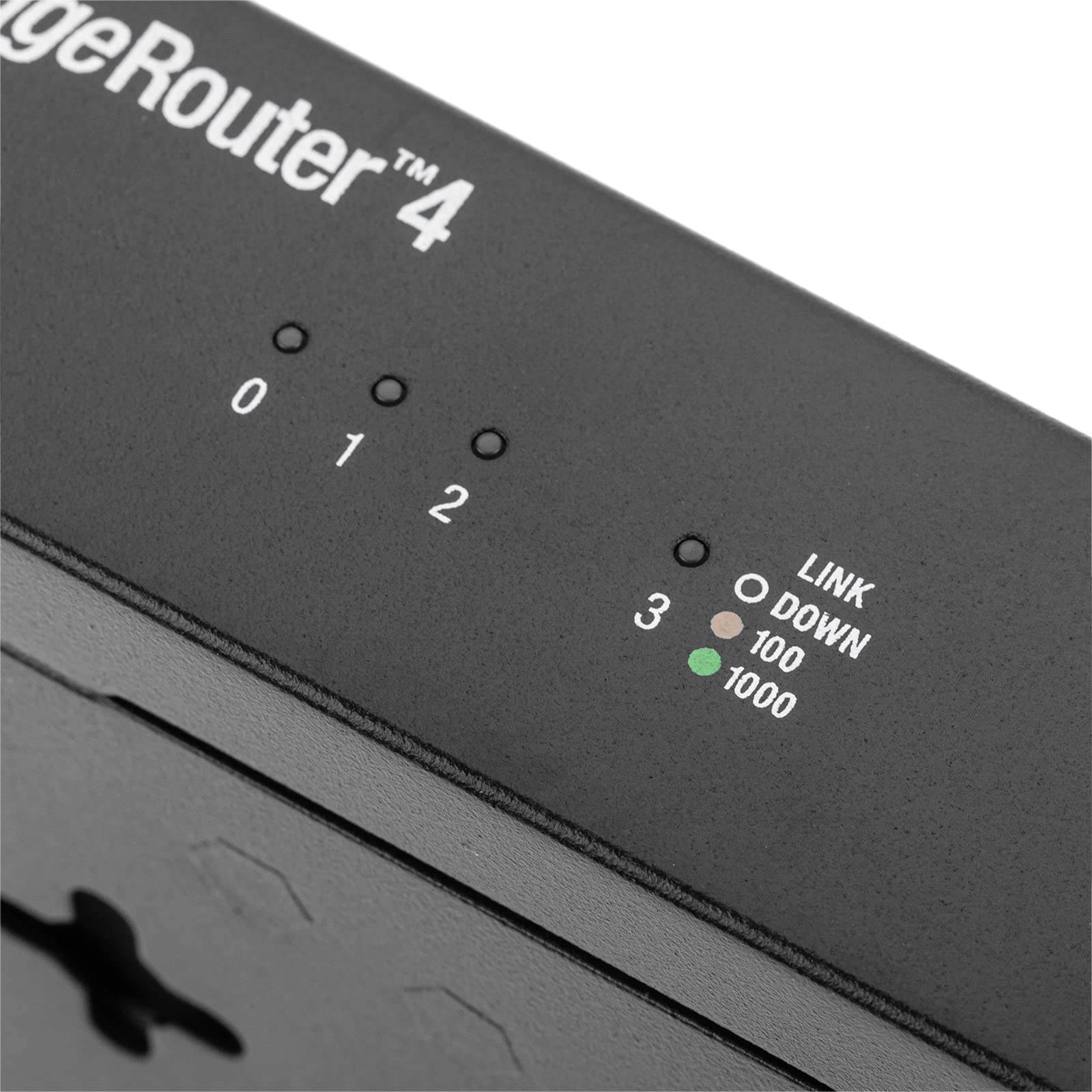
I wanted something more "Enterprise Grade" to replace my Asus AC86U router. (I have been using Asus flagship model routers for many years along with Merlin Firmware) But, Asus seems to have...hickups...with their firmware from time to time with bugs that take a long time to get fixed. I would hope that Ubquiti firmware is far more robust and tested. The EdgeRouter products is certainly for those who know how to setup network from scratch, knows CLI commands and terms and have worked with routers/switches such as Cisco etc. It is NOT a plug and play device. If you want more easy to setup and manage with a good GUI and wizards, go with the UniFi products. ( the upcoming UniFi Dream Machine is an all in one router, switch, AC AP, and controller, certainly will rival and beat out the top end Asus/Netgear etc stuff) Getting this guy all setup, I only need basic things, DHCP with Static Reservations, DDNS, Upnp....I don't need VLAN or VPN,Qos,Smart Ques...or any of the fancy stuff. I went to college for Networking back in 2012, have not done much with that knowledge in some time. It was nice to recall some of those things needed to setup this router. And, have the advanced abilities there in case I ever do wish to mess around with them. The GUI u can use...typical Enterprise...ugly, outdated looking, un-intuitive, and to me, not that logical. I still don't see why, just because its "Enterprise" that they can't make the GUI look nice and sleek and actually be enjoyable to use, like consumer products. Many other such "Enterprise/Corporate/Business" devices are like this, not just Ubquiti. But, really, no one cares cause u basically just do the initial config, then never touch it again.... I actually found that using the CLI for several of the things I needed to do was far easier, faster, and straight forward than digging around in the terrible GUI to find the setting I wanted to set or change. I like how the ER-4 has no direct port LEDs. But has them in the case else where. The Power/Status LED is a bit bright. (My networking equipment is in my bedroom, so LEDs are annoying and get covered in black tape). I have 1Gig Fiber connection. I have Eth0 as WAN. Eth1 is LAN connected to a Asus XG-U2008 unmanaged switch where all the other wired devices are connected to. ( I do not have that many devices, 9 wired, 7 wifi) My Asus RT-AC86U is now just a AC WiFi AP. (running Merlin Firmware) Since moving over to this EdgeRouter as my main router, Internet does feel zippyier, Smoother, more consistent. The ER-4 DPI (Deep Packet Inspection) Traffic Analyzer IS enabled and it is very cool to see all the stats. I do get my FULL 1Gig symmetrical and simultaneous WAN bandwidth with the ER-4, once you enable all the options for Hardware Offload AND do not use QOS or Smart Ques. Overall, it seems to be working well.
TrustPilot
2 месяца назад
3 недели назад


